

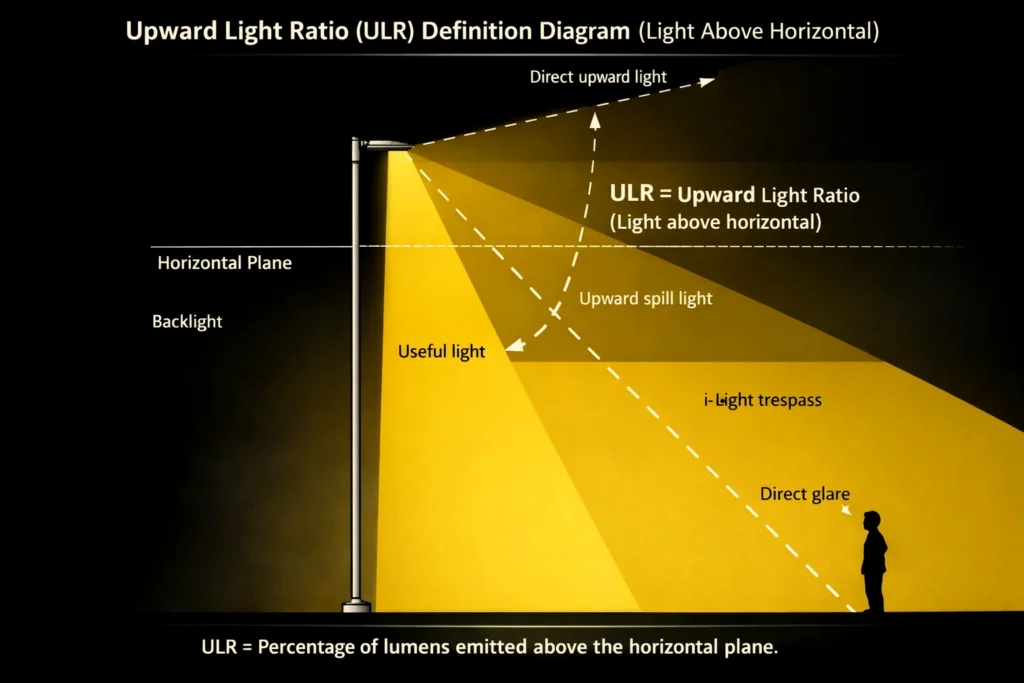
Upward Light Ratio (ULR) is the percentage of a luminaire’s light emitted above the horizontal in its installed position.
For EPC and government public-lighting projects, ULR matters because it affects sky glow, glare complaints, and acceptance checks.
In this guide you will get:
1) a clear ULR definition (installed-position based)
2) typical uplight limits by environmental zones (E1–E4)
3) how to verify ULR using IES photometric files + DIALux
4) how to choose the right compliance metric (ULR vs BUG vs Full Cut-off)
5) an EPC-ready checklist to reduce uplight without sacrificing illuminance
Need an approval-ready deliverables pack?
Send drawings or a Google Map pin → we provide DIALux report + matching IES files + BOQ-ready configuration within 24 hours.
✅ Request Lighting Design (DIALux/IES)
Quick Answer (30 seconds)
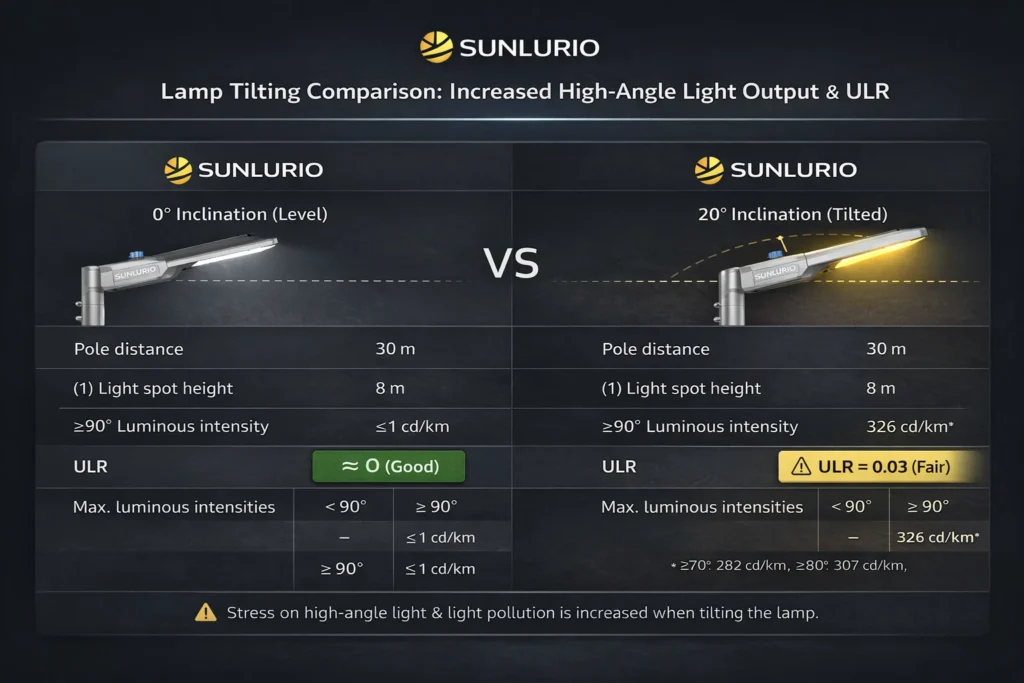
- ULR is NOT only a luminaire spec — it is an installation result (tilt + aiming can change it).
- The safest workflow for EPC acceptance is: Exact IES file → DIALux verification → lock aiming/tilt in installation notes.
✅ Get IES + DIALux verification pack
1) What is ULR (Upward Light Ratio)?
ULR describes how much light goes upwards (above the horizontal) when the luminaire is installed.
It’s not only a brochure number — tilt angle and aiming can change the real upward component on site.
Acceptance-friendly definition:
- ULR = Upward luminous flux / Total luminous flux (in the installed position)
- Lower ULR = less uplight and lower sky glow risk (when aiming/tilt are controlled)
ULR vs “no uplight / full cut-off”
- Full cut-off / 0% uplight focuses on preventing light above horizontal.
- A fixture can still create uplight if installed with wrong tilt or incorrect aiming.
EPC note: Treat ULR as an installed-position result, not a marketing label.
2) Typical ULR / uplight limits (E1–E4 environmental zones)
Many guidelines use environmental zones:
- E1: dark / rural (strictest)
- E2: low district / residential
- E3: urban area
- E4: city center / bright commercial
Project rule: Always follow the tender’s referenced standard (ILP/CIE/local).
If unclear, design conservatively: control near-horizontal angles, avoid unnecessary tilt, and verify with simulation.

3) ULR vs BUG Rating vs Full Cut-off: What EPC Should Use
In tenders and project discussions, these terms are often mixed up. They are related, but not the same.
Use the table below to avoid wrong specifications and acceptance disputes.
Quick comparison (EPC-friendly)
| Term | What it describes | Where it is used most | What it is good for | Common mistake |
|---|---|---|---|---|
| ULR (Upward Light Ratio) | % of luminaire flux emitted above horizontal in the installed position | Obtrusive light / environmental-zone discussions | A clear uplight indicator for compliance | Treating ULR as a fixed luminaire-only value (tilt/aiming changes it) |
| BUG Rating (Backlight / Uplight / Glare) | A 3-part rating summarizing photometric risk zones | North America / IES-style spec checks | Fast screening for uplight + glare risk | Using a generic BUG rating without verifying the exact IES/model |
| Full Cut-off / 0% Uplight | Minimal/no light above 90° (concept + optic design) | Dark-sky / strict obtrusive-light projects | Strong uplight control when installed correctly | Assuming it automatically guarantees low glare or good uniformity |
What EPC should use (practical rule)
- If the project mentions sky glow / obtrusive light / environmental zones → use ULR for compliance discussion.
- If the project is screening fixtures quickly → check BUG (if available) AND confirm the IES file matches the exact model.
- If the project is in dark or sensitive areas → specify full cut-off / 0% uplight PLUS require simulation verification for real aiming/tilt.
Acceptance-safe approach (best practice)
No single metric guarantees real-world performance. The safest EPC workflow is:
1) request the exact IES photometric file for the offered luminaire
2) verify tilt + aiming + pole layout in a DIALux report
3) lock aiming angles in installation notes for site commissioning
✅ Request IES + DIALux + BOQ pack
4) How to check / calculate ULR in real projects
4.1 Check from photometrics (IES files)
Use the correct IES photometric file for the offered model.
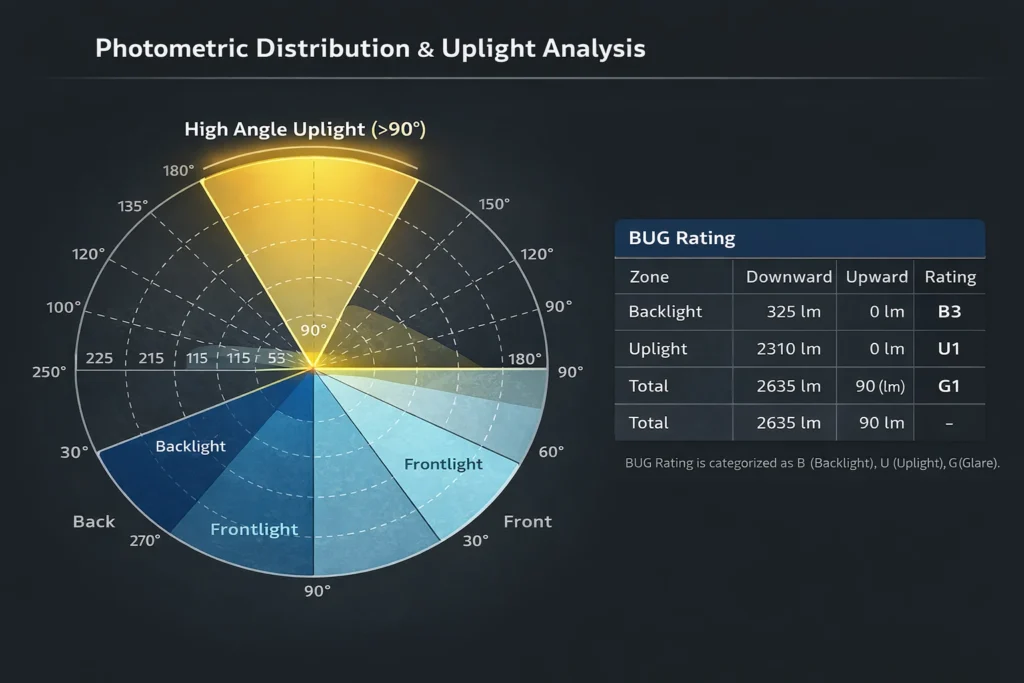
- Check high-angle intensity (near and above 90°).
- If a supplier provides a generic IES, simulation results become unreliable.
✅ Request the correct IES files
4.2 Verify at installation level (DIALux)
DIALux reflects real installation:
- pole height, outreach, spacing
- luminaire tilt
- aiming angles (especially for sports lighting)
For acceptance, use a matching IES + DIALux report.
✅ Request a DIALux verification report
5) Why uplight happens (even with good luminaires)
1) Tilt angle inherited from old brackets
2) Wrong aiming to “fix dark spots”
3) Optics not designed for cut-off (lens + LED board position)
4) Too-wide beam choice causing spill and uplight
6) Practical checklist to reduce ULR (without losing lux)
6.1 Street / roadway lighting
For roadway projects, keep 0° tilt whenever possible and control near-horizontal angles.
- Keep 0° tilt whenever possible
- Control uniformity by distribution + spacing, not by adding tilt
- Verify with DIALux and keep the report in the acceptance pack
6.2 Sports / area lighting (tennis, football, stadium)
Sports and area lighting often require aiming, so optics and spill control matter.
- Use asymmetric optics + proper aiming
- Add visors/louvers where needed
- Control spill boundaries and document aiming table
- Deliver: DIALux report + aiming table + IES list
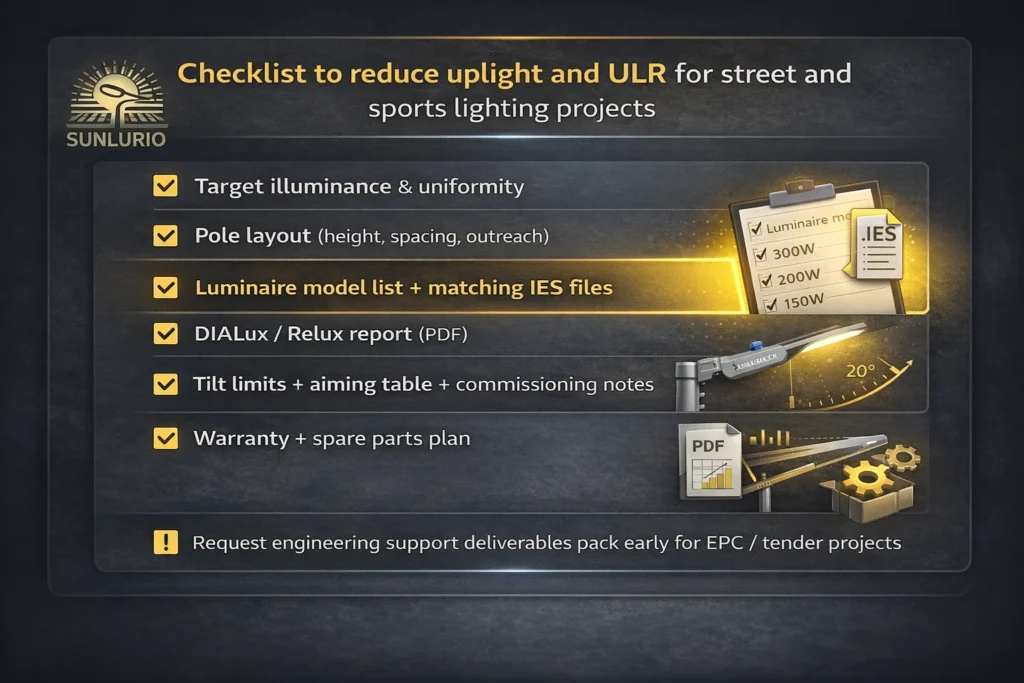
7) EPC / Government Tender Checklist (copy-paste)
Use this checklist to avoid redesign loops and acceptance disputes.
Required deliverables
- Target illuminance & uniformity
- Pole layout (height, spacing, outreach)
- Luminaire model list + matching IES files
- DIALux/Relux report (PDF)
- Tilt limits + aiming table + commissioning notes
- Warranty + spare parts plan
✅ Request an approval-ready deliverables pack (IES + DIALux + BOQ)
8) Common mistakes that cause acceptance disputes
- Using non-matching IES files
- Changing aiming on site without updating simulation
- Adding tilt instead of fixing distribution
- No documented deliverables pack for inspection
If you want to reduce disputes, request a verification package before installation:
✅ IES + DIALux + aiming notes
FAQ
What does ULR mean?
ULR is the percentage of light emitted above the horizontal in the luminaire’s installed position.
Can a 0% uplight luminaire still create uplight?
Yes. Tilt and aiming can add upward components. Verify in DIALux with real installation parameters.
How do I reduce uplight quickly?
Use 0° tilt, cut-off optics, correct beam angles, and lock aiming with an acceptance-ready DIALux report.
What should EPC teams request for ULR compliance?
Request the exact luminaire IES file, a DIALux/Relux report, and installation notes (tilt limits + aiming table).
What is BUG rating in lighting?
BUG rating summarizes Backlight, Uplight, and Glare into a simple rating format to screen photometric risks. Use it for quick fixture comparison, but still verify installation tilt/aiming and confirm the IES file matches the offered model.
Does full cut-off mean no glare?
Not always. Full cut-off mainly controls high-angle uplight. Glare can still be high if optics, mounting height, aiming, and uniformity are not handled correctly—so a DIALux verification report remains important.
Next step
Send your drawings or Google Map link → get DIALux + IES + BOQ within 24 hours.
✅ Request Lighting Design (DIALux/IES)
Related Pages
- Engineering Support — DIALux/IES deliverables, BOQ-ready configuration, acceptance documents
- Solutions — project-ready configurations for different road and area scenarios
- Contact — share drawings / Google Map link and get support